> ## Documentation Index
> Fetch the complete documentation index at: https://asymptotelabs-fix-postinstall-refresh-user-hooks.mintlify.site/llms.txt
> Use this file to discover all available pages before exploring further.
# Agent Harness Inventory
> Review installed, configured, managed, and observed state for supported local agent harnesses
## Overview
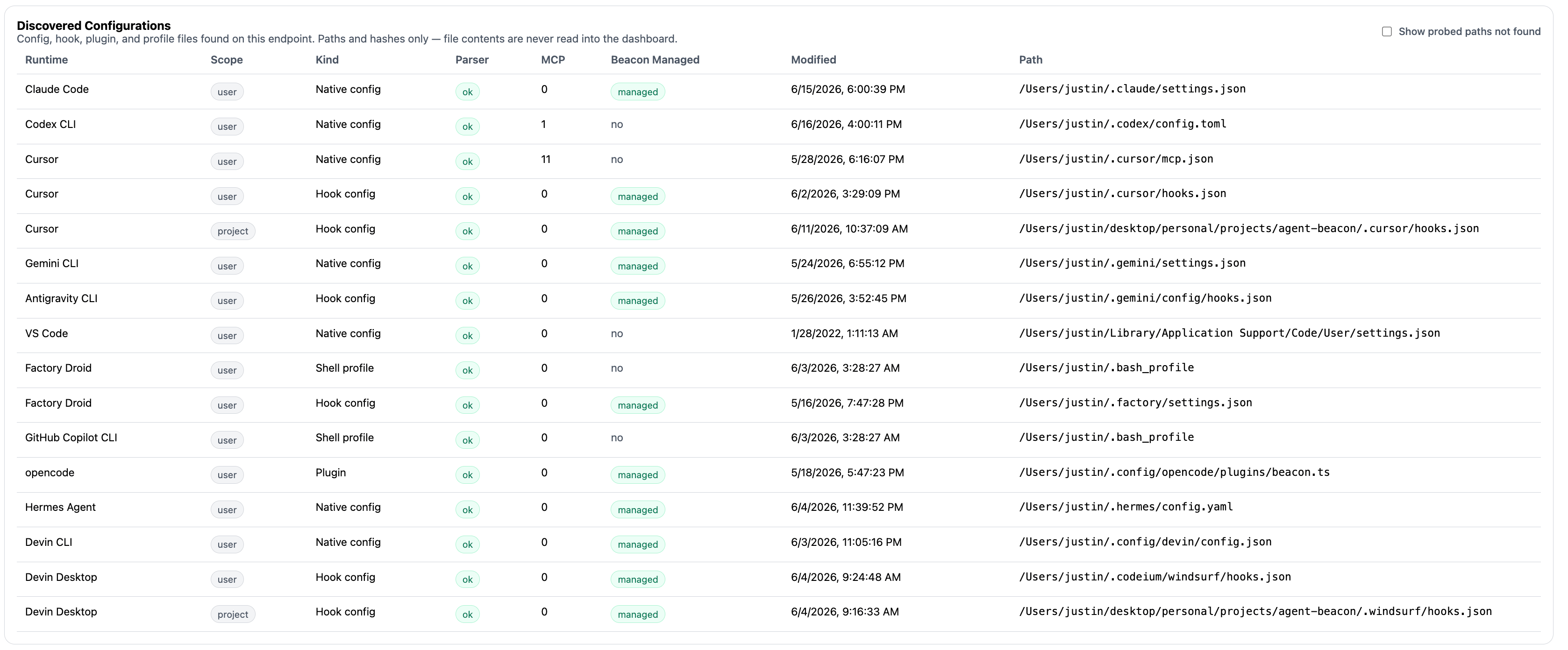
Agent harness inventory shows the supported local agent runtimes Beacon can see on an endpoint and how complete their telemetry coverage appears to be.
Use it to answer:
* Which supported [agent harnesses](/runtimes) are installed locally?
* Which harnesses have local telemetry config, hooks, OTLP settings, or launch environment entries?
* Which harnesses appear Beacon-managed versus customer-managed?
* Which harnesses have recently emitted Beacon endpoint events?
## Coverage States
 `beacon endpoint inventory` summarizes each supported harness with coverage states that are useful for deployment review:
| State | Meaning |
| ---------- | ------------------------------------------------------------------------------------------------------------------------ |
| Installed | The runtime or executable appears to be present locally. |
| Configured | Beacon can inspect a local telemetry setting, hook entry, launch environment, plugin, or runtime config for the harness. |
| Managed | The telemetry surface appears to be configured by Beacon. |
| Observed | Recent events in the configured runtime log reference the harness. |
A harness can be installed but not configured, configured but not observed, or observed in a different user-mode or system-mode runtime log than the one you are reading.
## Review Workflow
Start with the fleet-friendly inventory view:
```bash title="Show harness inventory" theme={null}
beacon endpoint inventory
```
Use `--all` when you want to compare all supported harnesses, including runtimes that are not detected on the endpoint:
```bash title="Show all supported harnesses" theme={null}
beacon endpoint inventory --all
```
Use the narrower discovery command when you only need supported runtime detection and telemetry state:
```bash title="Discover supported harnesses" theme={null}
beacon endpoint discover --all
```
For hook-based harnesses, inspect hook status directly:
```bash title="Check hook telemetry" theme={null}
beacon endpoint hooks status --all
```
## What To Look For
* Expected harnesses that are installed but not configured.
* Harnesses configured through customer-managed settings instead of Beacon-managed hooks or OTLP configuration.
* Harnesses that are configured but not observed after a user has generated activity.
* User-mode and system-mode mismatches, especially when a system collector writes `/var/log/beacon-agent/runtime.jsonl` while a user command reads `~/.beacon/endpoint/logs/runtime.jsonl`.
* Hook-based runtimes that need a restart before new hook configuration is loaded.
Inventory is local-only. It reads supported local paths and the configured runtime log; it does not authenticate to hosted agent accounts to enumerate remote sessions or cloud workspaces.
## Related
Compare supported harnesses and collection paths.
Review inventory flags, filtering, and JSON output.
Discover supported harnesses and telemetry state.
Install, inspect, and uninstall hook-based telemetry.
`beacon endpoint inventory` summarizes each supported harness with coverage states that are useful for deployment review:
| State | Meaning |
| ---------- | ------------------------------------------------------------------------------------------------------------------------ |
| Installed | The runtime or executable appears to be present locally. |
| Configured | Beacon can inspect a local telemetry setting, hook entry, launch environment, plugin, or runtime config for the harness. |
| Managed | The telemetry surface appears to be configured by Beacon. |
| Observed | Recent events in the configured runtime log reference the harness. |
A harness can be installed but not configured, configured but not observed, or observed in a different user-mode or system-mode runtime log than the one you are reading.
## Review Workflow
Start with the fleet-friendly inventory view:
```bash title="Show harness inventory" theme={null}
beacon endpoint inventory
```
Use `--all` when you want to compare all supported harnesses, including runtimes that are not detected on the endpoint:
```bash title="Show all supported harnesses" theme={null}
beacon endpoint inventory --all
```
Use the narrower discovery command when you only need supported runtime detection and telemetry state:
```bash title="Discover supported harnesses" theme={null}
beacon endpoint discover --all
```
For hook-based harnesses, inspect hook status directly:
```bash title="Check hook telemetry" theme={null}
beacon endpoint hooks status --all
```
## What To Look For
* Expected harnesses that are installed but not configured.
* Harnesses configured through customer-managed settings instead of Beacon-managed hooks or OTLP configuration.
* Harnesses that are configured but not observed after a user has generated activity.
* User-mode and system-mode mismatches, especially when a system collector writes `/var/log/beacon-agent/runtime.jsonl` while a user command reads `~/.beacon/endpoint/logs/runtime.jsonl`.
* Hook-based runtimes that need a restart before new hook configuration is loaded.
Inventory is local-only. It reads supported local paths and the configured runtime log; it does not authenticate to hosted agent accounts to enumerate remote sessions or cloud workspaces.
## Related
Compare supported harnesses and collection paths.
Review inventory flags, filtering, and JSON output.
Discover supported harnesses and telemetry state.
Install, inspect, and uninstall hook-based telemetry.